
Access
Access is configured for a particular form. In Update access, Permissions determines which tasks a user can access, while Rights determines what they can do with those tasks. Export and removal from participants after approval are separate options.
For example, a user can see all tasks in a form while only being allowed to edit them, without permission to delete or close them.
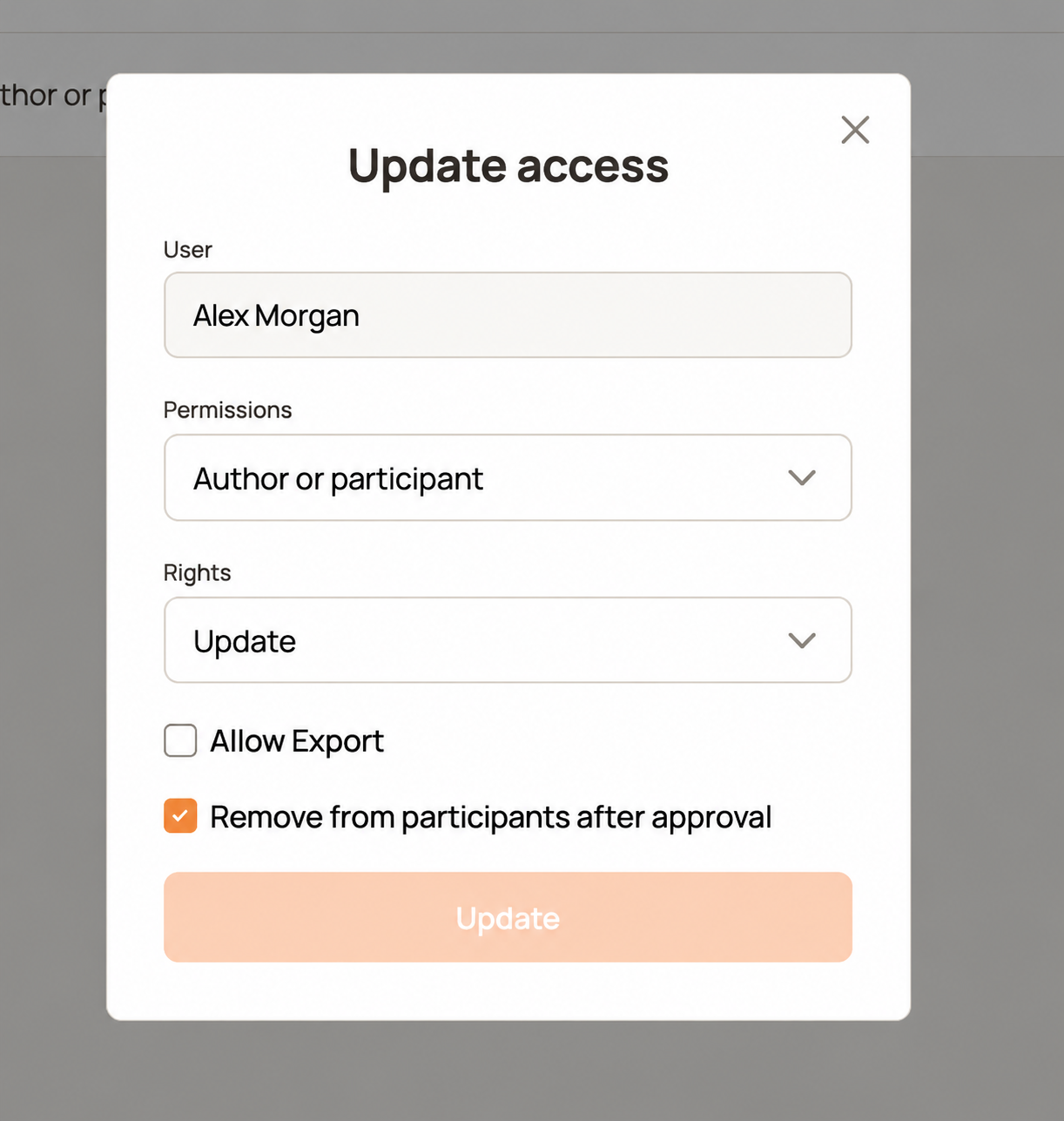
Example settings. The screenshot uses the fictional name Alex Morgan in place of the original user's name.
Permissions: which tasks are accessible
All — every task in the form
The widest task scope within the selected form: the user sees all its tasks, regardless of who created them or who participates.
Use it for dispatchers, coordinators, or staff who need an overview of the entire register. All does not automatically grant access to other forms or permission to delete or close tasks. Those actions depend on Rights.
Author or participant
Users see tasks they created and tasks where they have been added as participants. This includes being selected as a participant or recipient in a task comment.
An ordinary comment that does not add the user as a participant does not give them access. A user must already have access to the form before they can be added as a participant.
Use it for people handling or approving specific tasks. For example, a manager creates a request and adds an accountant in a comment for approval; the accountant can then access the request.
Catalog — personal task list with access by link
The ordinary task list follows the Author or participant scope. In addition, the user can open another task in this form through a direct link without being a participant.
Use it for customer, product, or vehicle registers: staff can open the record they need from a linked task without seeing the entire register in their working list. Opening a record in another form still requires access to that form; the relationship alone does not grant it.
When selecting a record through a Form field, catalog search can also find tasks where the user is not a participant. The current search requires at least three characters for this broader lookup.
For example, a user opens a customer card from an order. Their Rights for the customer form determine which changes they can make. Catalog does not mean read-only access.
Head of department
The task list includes the user's own tasks and tasks explicitly accessible to active colleagues in the same department as authors or participants. The department comes from the user's profile, and the scope applies to the current form.
Use it for a manager who needs a team overview without being added to each task. For example, a sales manager sees requests created by or shared with colleagues in the sales department.
Without a department assigned, the list is limited to the user's own task access. A colleague having All access does not automatically make the entire register appear in this list.
Current behavior also permits opening a task in this form by direct link without a participation check. The department filter on the list should therefore not be treated as a strict barrier against opening other departments' tasks.
Rights: allowed actions
Rights apply to the tasks available under the user's Permissions.
| Setting | Allowed actions |
|---|---|
| Update | Edit tasks |
| Update, close | Edit and close tasks |
| Update, delete | Edit and delete tasks |
| Update, delete, close | Edit, delete, and close tasks |
Close means completing a task. It is separate from approval in comments. Delete permits deleting the task, rather than merely changing its fields.
For example, choose Update for a user who edits work in progress, or Update, close if they should also complete it. Workflow and field restrictions still apply; Update does not make every field editable at every step.
Allow Export
Allows the user to export the form's task table to Excel. Enable it for users who need reports or further processing outside HCAPP.
Export is separate from editing, closing, and deleting. It does not broaden task access: the export respects the user's access and selected filters.
Remove from participants after approval
When enabled, the user is automatically removed from the task's participants after choosing Approved in the comments. This helps clear processed tasks from a list based on participation.
For example, an accountant receives a request, reviews it, and approves it. Their participation is removed without manually cleaning up the list.
- The setting applies to the user whose form access is being configured.
- An ordinary comment or a Rejected action does not trigger this removal.
- The task and comments remain; approval does not itself close the task.
- Broader access, such as All or department access, can keep the task visible. Catalog still permits opening it by direct link.
- The user can be added as a participant again if further involvement is needed.
Configure access
- Open the form settings and its access section.
- Select the user and open Update access.
- Choose the task scope under Permissions.
- Choose allowed actions under Rights.
- Enable Allow Export and Remove from participants after approval if needed.
- Click Update to save.
See Workflow for responsibilities and approval steps, and Roles for user roles.
If AI-Admin cannot add access
Access already exists: no new access was created. Open Profile → Configuration → form → Accesses (Access in older versions), find the user or bot, edit permissions and rights, and save. For department/position access, edit its group rule. AI-Admin does not silently replace an existing access.
Bot form limit reached: the error states the current limit. Review the bot's forms and manually remove an unneeded access in that form's Accesses tab before adding the new one, or create another bot in Profile → Users. AI-Admin does not remove another access to make room. These changes require a super-admin; an admin should ask their super-admin.