
Business templates
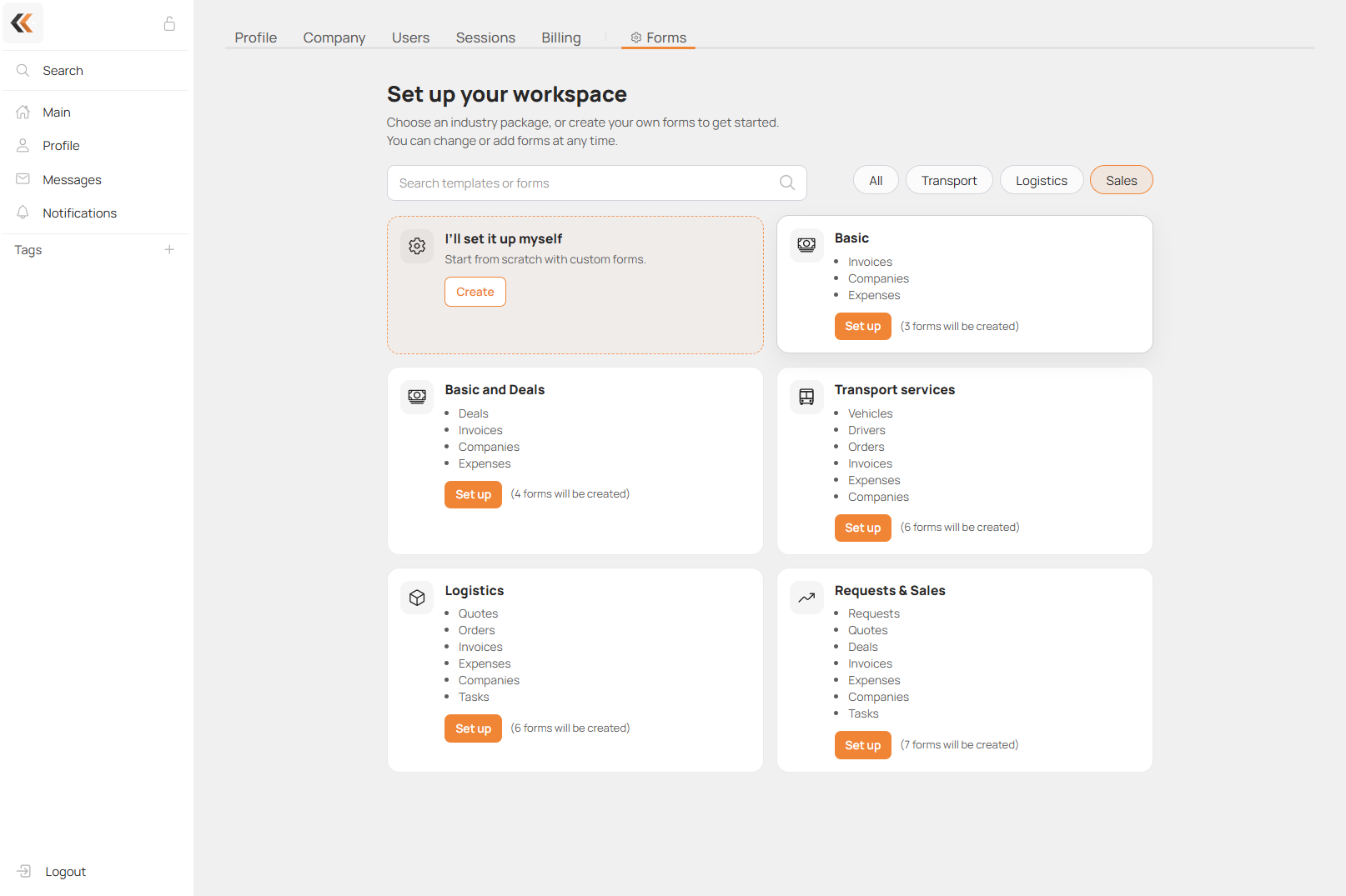
A template set creates several linked forms for a business niche. Start with what you need to track today; optional sales stages can be added later. AI-Admin can help choose a set before anything is created.
First identify your workflow
Explain what your company does and what you want to track first. For transport, clarify whether you operate your own vehicles and drivers or arrange work through other carriers as a B2B intermediary. Say whether requests, quotes and contracts are necessary now, or whether you mainly need orders and billing.
Recommended starting points
| Business | Starting point | Minimum to consider |
|---|---|---|
| Lead collection and simple CRM | microCRM | Clients and Leads/Pipeline |
| Sales from inquiry to payment | Requests & Sales | Requests, Quotes and Deals; Invoices when billing is needed |
| Carrier with its own fleet | Transport services | Drivers, Vehicles, Orders/Trips, Invoices and Expenses; client/supplier records required by links |
| B2B freight forwarder / service intermediary | Logistics, or Business Base+ for a deal-centred workflow | Clients/suppliers, Deals or Orders, Invoices and Expenses |
| Specialist services with commission | Adapt available templates; verify a dedicated set | Specialists, Clients, Orders/Jobs, Invoices |
| Vehicle rental | Adapt available templates; verify a dedicated set | Vehicles, Renters, Rentals, Contracts, Invoices |
| General billing | Business Base | Client/supplier records, Invoices and Expenses |
For an intermediary, Requests, Quotes and Contracts are optional stages. This is not a warehouse-specific recommendation. Check the actual available templates: a Contracts form is not guaranteed to be included. AI-Admin reads the live catalog before promising exact set contents.
The table describes a recommended minimum, not a selectable subset of every set. Applying a full set creates all forms in that set. If it contains more than you need, ask for individual available form templates and their required links instead.
Specialist services with a commission
For a business that supplies specialists or arranges their work and retains a commission, start with Specialists/Masters, Clients, Orders/Jobs and Invoices. Add separate Expenses/Settlements when payouts and costs need their own records. These are recommended forms; verify the available templates before creating them.
Each job should contain its date, start/end time, specialist, description of work, status, customer price, business commission and amount payable to the specialist. In Calendar, select the job's date/time field and the Person or Form field identifying the specialist. The calendar can then show time slots and filter jobs by specialist.
First agree who receives the customer's payment and whether commission is fixed or percentage-based. For example, for a 100 order and a commission of 20%, the business receives 20 and the specialist is owed 80 before other costs. A user's Rate is a separate unit price/cost, not automatically a commission percentage. Person autofill can copy that rate into an order for calculation.
Report by order, specialist and period: customer revenue, business commission, specialist payable and actual payments where recorded. Do not treat an amount owed as already paid. Working hours and absences describe availability; Portal User → Master provides an optional external cabinet.
Income and commission in the master card
Use Linked Total in Masters to sum the Income field of Orders linked to that master through a Form field. Calculate commission with a Number formula using that total and the percentage saved in the master card. If the percentage is the master's share, commission is the remainder after that share; if it is the commission rate, multiply income by it directly. Linked Total also supports Average and Count.
Vehicle rental
Vehicle rental is different from freight transport. Start with Vehicles, Clients/Renters, Rentals/Bookings, Contracts and Invoices; add Expenses and Maintenance/Insurance records as needed. An Orders template may be adapted for bookings if suitable. Contracts and a complete rental set are not guaranteed to exist in the current template catalog.
A rental needs the vehicle, customer, start/end date and time, price/unit and status. Add deposit, mileage, condition photos and handover/return information if required. Set Calendar to the rental interval and use a Form resource linked to Vehicles. Do not assume that displaying bookings automatically prevents overlaps.
Use a contract print template for the document. Signature captures a drawn signature in the task as an attached file, for example on a handover or acceptance record. It does not automatically sign or seal the generated PDF. Signature field setup is done manually in the form's Fields tab; the current AI-Admin field tools do not create this field.
Maintenance and insurance reminders
Keep maintenance and insurance dates in the vehicle-related records. For independent deadlines, use separate tasks linked to the vehicle, each with its own Due Date. Multiple Due Date fields in one task write to the same task deadline.
A super-admin configures Profile → Configuration → form → Automation → date reminder: choose the deadline/primary-date source, offset before the date, send time and recipient. Current date reminders send email. Filling a date alone does not activate reminders. AI-Admin can explain this setup or hand it to support; it currently has no automation-configuration tool.
AI reporting for both scenarios
An available HCAPP connection or MCP can let ChatGPT or another compatible AI client analyse orders, commissions, specialist activity, rental usage, invoices and expenses. Verify connection availability and client compatibility first; a public plugin is not assumed to be installed or available.
Current HCAPP MCP provides read-only analytics. It requires server enablement, application registration and an authorised BOT with access to the relevant forms. It does not create bookings, change orders, sign contracts or issue invoices. Integrations that write data need a separate setup using supported Bot API operations. For complete reports, load all matching pages and distinguish booked amounts from actual payments.
Apply a set
A full set can be applied only when the company has no forms. A super-admin opens Profile → Configuration, opens the templates section (Templates / Set up your workspace), checks the set and chooses Set up.
In AI-Admin, first agree on the set or individual forms. The assistant explains the recommendation and asks for confirmation before creating anything. After setup, configure fields, workflow and accesses.
If the workspace already has forms, add only the missing templates and connect them to existing registers. Do not delete useful data just to apply a full starter set.
When the standard templates do not fit
For a custom workflow, missing templates or setup the assistant cannot complete, AI-Admin can hand the chat to support. The email contains the conversation and a summary of the business, desired forms and unresolved question. The assistant confirms the handoff only after the email was successfully sent; if sending fails, it reports that instead. Support uses the user's account email to reply.