
Facebook
The Facebook extension connects a Facebook page to a form. A message sent to the page in Messenger becomes a task; later messages from the same person go to the same task, and operators reply from the task.
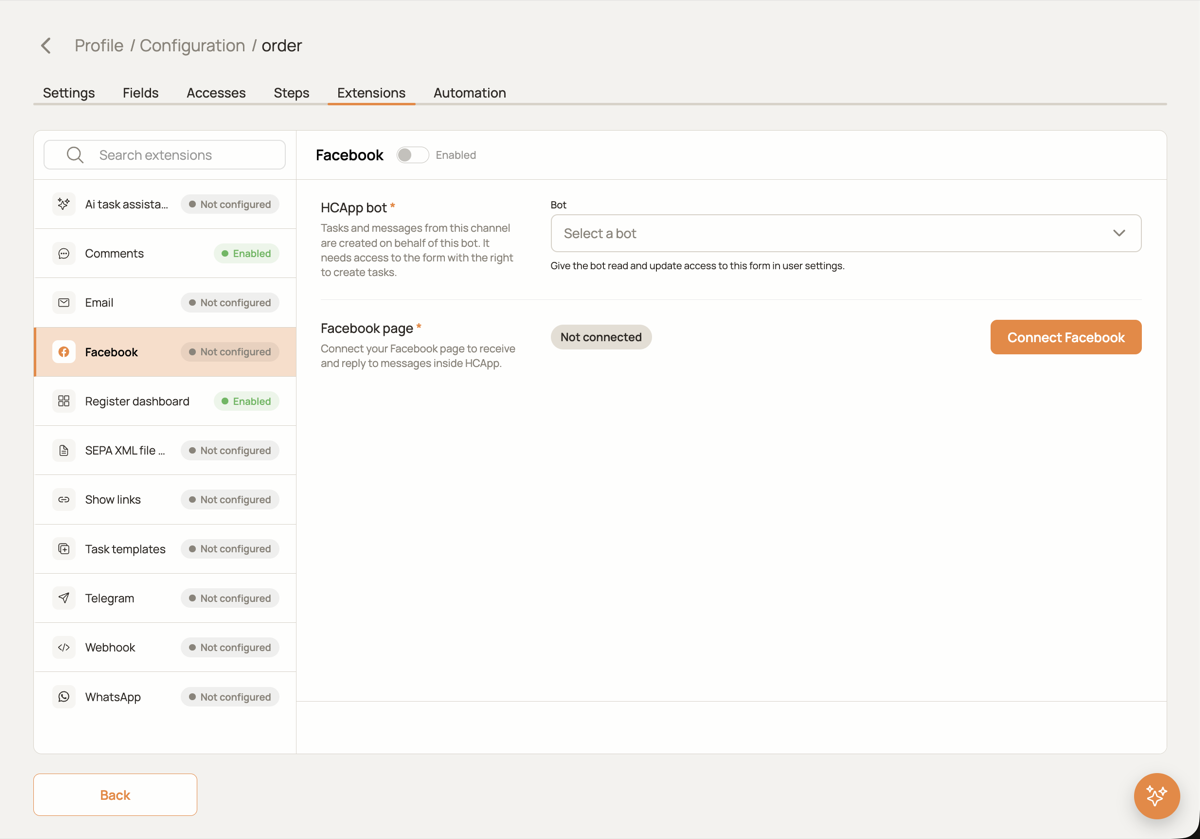
Setup
- Choose the HCAPP bot. A user with the role
BOTthat has access to this form with the right to create tasks. Tasks and messages from Facebook are created on behalf of this bot. The bot can be chosen before the page is connected; the choice is applied as soon as the connection is made. - Connect the page. Press Connect Facebook and log in to Facebook in the window that opens. Choose the page and allow HCAPP to read and send its messages. HCAPP subscribes the page to message events itself; no tokens to copy.
- After the connection the card shows the page ID, the page name and the masked access token. Disconnect Facebook removes the subscription.
How messages work
- The first message from a person opens a task; the sender's name and profile picture are stored with the message.
- Later messages from the same person go to the open task of that sender. A finished task does not collect messages any more, the next message opens a new one.
- Attachments (images, files) are downloaded and attached to the message.
- Operators reply in the Facebook tab of the task; the reply is sent to Messenger on behalf of the page.
Form fields
Which fields of a new task receive the sender ID, the sender's name and the text of the first message.