
WhatsApp
The WhatsApp extension connects a WhatsApp Business number (Meta Cloud API) to a form. Messages from a customer become a task; in the Chat mode operators reply from the task.
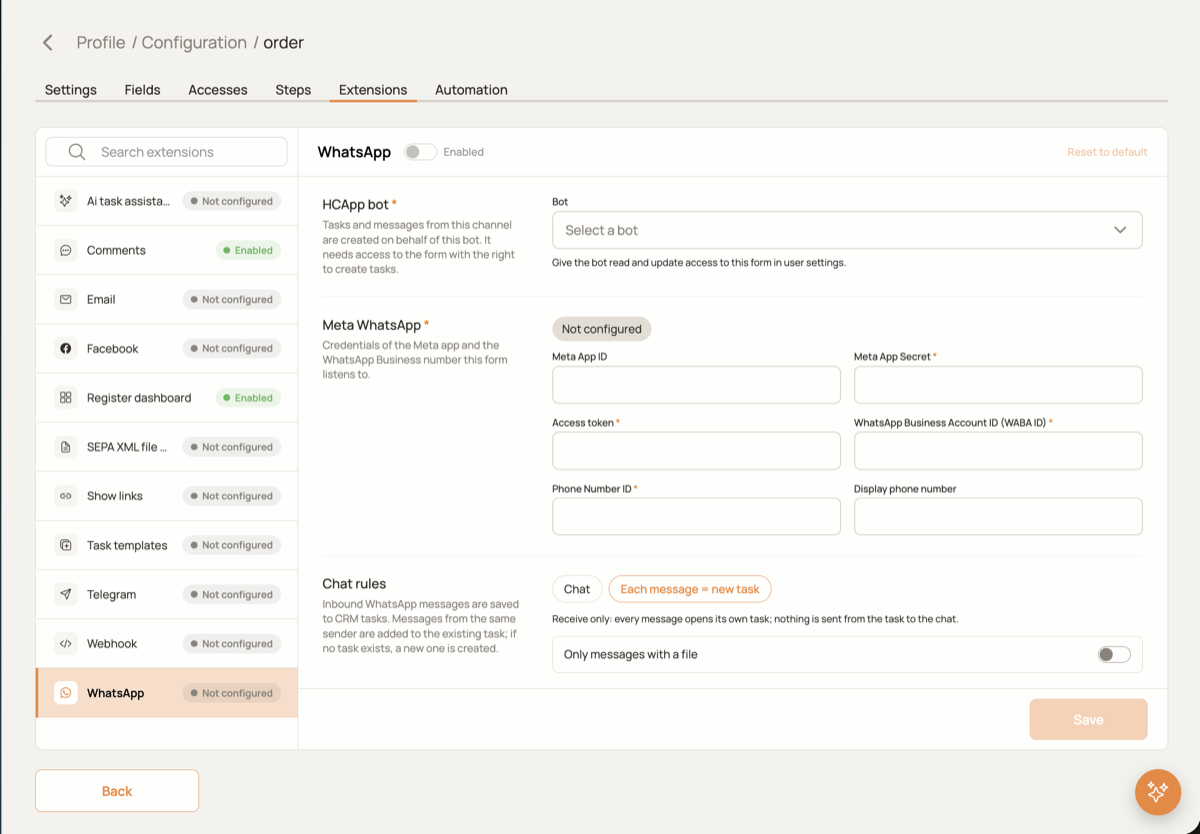
Setup
- Choose the HCAPP bot. A user with the role
BOTthat has access to this form with the right to create tasks. Tasks and messages from WhatsApp are created on behalf of this bot. - Meta credentials. Fill in the Meta App Secret, the Access token, the WhatsApp Business Account ID and the Phone Number ID from the Meta app dashboard. Press Save.
- Register the webhook in Meta. After saving, the card shows the Callback URL and the Verification token. Put them into WhatsApp → Configuration of your Meta app and subscribe to the
messagesfield.
Chat rules
| Setting | Meaning |
|---|---|
| Chat | Messages from the same sender stay in one open task; operators reply from the task. Allow replies in the same task keeps the dialogue in one task instead of opening a new one per message. |
| Each message = new task | Receive only: every message opens its own task, replies are disabled. |
| Only messages with a file | Each message = new task only. Messages without media are ignored. |
| Where to store files | Each message = new task only. In the message, in the task files, or in a Files field of the form. |
In the Each message = new task mode media is downloaded before the task is created, so the AI assistant sees the files right away. WhatsApp sends every file as a separate message, so two files sent together give two tasks.
Form fields
Which fields of a new task receive the sender's number, the sender's name, the text of the first message and the receiving WhatsApp number.
In the task
Messages are shown in the WhatsApp tab of the task as a chat. In the Each message = new task mode the composer is replaced by a hint.